
Your video is ready. How do you download and post it?
Master Of Fish editorial · Last updated:
On this page
Save a copy to your device before posting. My creations keeps task records, but it is not permanent file storage. Successful videos can be viewed and downloaded for 7 days after completion. Each task shows its own deadline; the Privacy Policy explains storage and deletion.
1. Where do I download my video?
Sign in with the account you used to generate it and open My creations. Once the status says the task succeeded, play it and click Download video on the right.
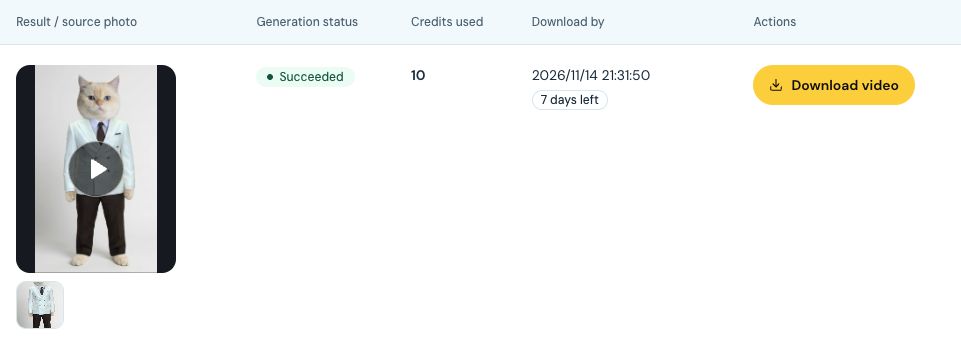
Check the status and deadline, then use Download video. The left cell contains the player and input thumbnail.
Open full-size screenshot
If it is processing, do not submit again just because the result is not ready. If it failed, check the credit return. If it is missing, check that you are using the right account. A task record may remain after its file expires, so I suggest downloading as soon as it is ready.
2. What should I check before posting?
Do not judge it by the cover image. I would check three things:
The character: look for changes to the face, hands or pet paws. Does it still look like the character you intended?
The cutting action: check the target's shape, knife contact and table edges. Make sure vertical framing has not hidden the main action.
The audio: listen for odd sounds, check how it fits the picture and confirm that you can use it. The homepage comparison plays the original soundtrack for both sides; it does not prove what is in your downloaded file. Listen to your actual output.
Do not post an obvious motion error or assume upscaling will repair it. A new generation is a new paid task. If the video looks right and you only want more pixels, read when upscaling makes sense and what it costs.
3. Do I need permission and an AI label?
Your own photo is the straightforward choice. For a friend's photo, ask whether they agree to this AI video use. Being able to download an image does not establish permission. Check the necessary rights to reference footage and audio too.
For realistic AI-generated or altered content, check TikTok’s AI labeling guidance and YouTube’s disclosure requirements before posting. Make it clear this is generated entertainment. A caption such as “An AI fish-cutting video made with my cat's photo” explains the idea. Do not suggest that a real person performed the action or that the original creator endorses you.
If permission is unclear, use material you are authorized to use. For work or privacy issues, open a support ticket. See the terms of service for the site's usage rules.